Software Request Approval — AI Architecture
An AI multi-agent system built on Microsoft Foundry that turns a multi-day manual software approval process into a 3–7 minute automated workflow.
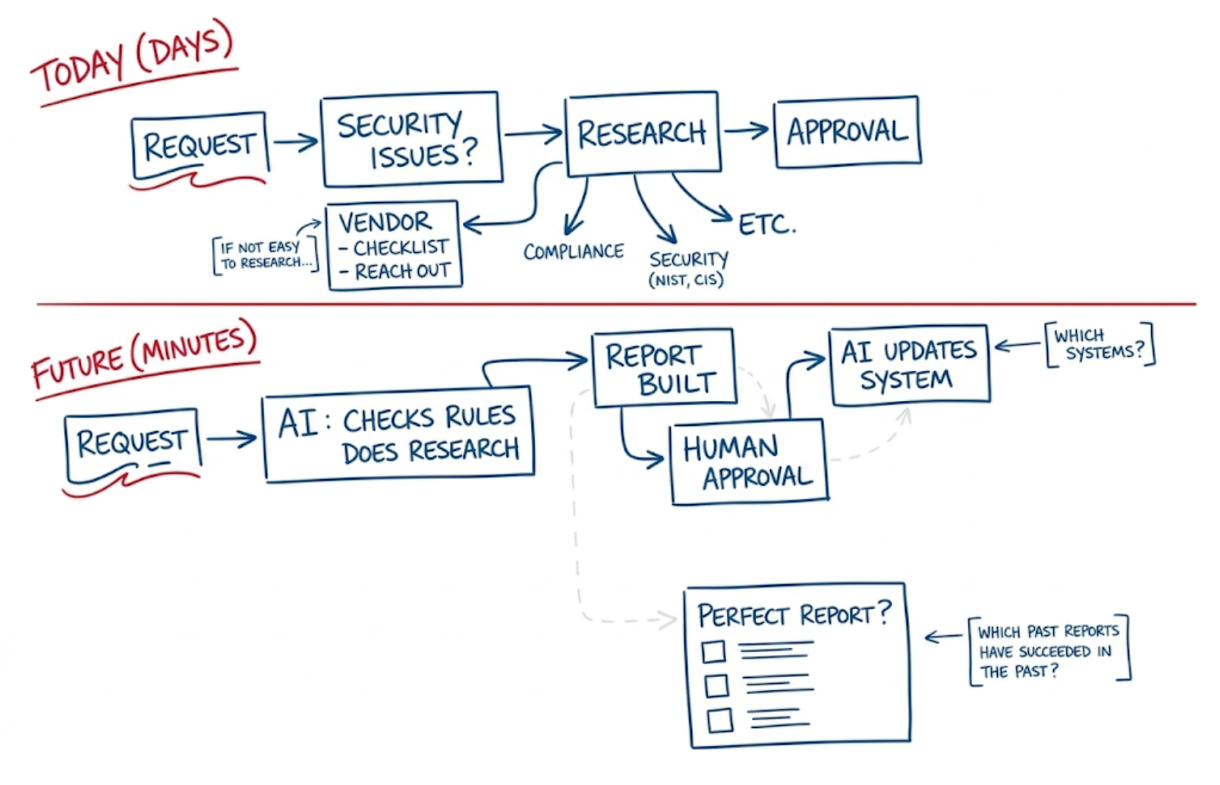
What It Does
The system receives a software request, automatically researches compliance, security, and vendor risk using parallel specialist AI agents, generates a structured approval report, and routes only the final human decision — all within minutes.
| Capability | Platform / Service |
|---|---|
| Agent orchestration & hosting | Microsoft Foundry Agent Service |
| LLM reasoning | Azure OpenAI gpt-4o / o3 |
| Deep web research | Grounding with Bing Search |
| Knowledge & memory | Foundry Agent IQ (Knowledge Store) |
| Workflow & approval | Microsoft Copilot Studio + Work IQ |
| System-of-record updates | Power Automate / Logic Apps |
| Monitoring & evaluation | Azure AI Foundry Evaluation + App Insights |
Documentation Map
| Page | Description |
|---|---|
| Architecture Overview | High-level design, key platforms, end-to-end flow |
| Multi-Agent Design | All six agents — prompts, tools, and topology |
| Getting Started | Prerequisites, Azure provisioning, project setup |
| Configuration | LLM models, Foundry agent setup, Knowledge/Bing |
| Usage & Approval Workflow | Copilot Studio, Work IQ, and the Teams approval card |
| Report Specification | Report template structure and quality gates |
| Security & RBAC | Managed identities, role assignments, content safety |
| Monitoring & Evaluation | App Insights, Foundry Evaluation, key metrics |
| Troubleshooting | Common issues and fixes |
| FAQ | Frequently asked questions |
| Glossary | Terms and definitions |
How It Works
- An employee submits a software request via a Copilot Studio bot in Microsoft Teams.
- The Orchestrator Agent extracts structured metadata and fans out to three specialist agents in parallel.
- Research agents (Compliance, Security, Vendor) gather evidence using Bing Grounding and Azure AI Search.
- The Report Builder Agent assembles a structured Markdown approval report with a risk matrix and recommendation.
- Power Automate routes the report to the correct approver via a Teams Adaptive Card — one click to Approve, Conditional Approve, or Reject.
- The System Updater Agent writes the decision back to ServiceNow, Entra ID, and SharePoint.
Total elapsed time: ~3–7 minutes (vs. multiple days manually).
“From Days to Minutes” — Replace a manual, multi-day software approval workflow with an AI multi-agent system built on Microsoft Foundry that researches, evaluates, and reports on software requests automatically, routing only the final decision to a human approver.
Table of Contents
- Architecture Overview
- Multi-Agent Design
- LLM & Web Search Configuration
- Report Output Specification
- Azure Resource Deployment
- Foundry Agent Configuration (No-Code)
- Microsoft Copilot Studio & Work IQ Integration
- Foundry Agent IQ (Knowledge & Grounding)
- Human Approval Workflow
- Security & RBAC
- Monitoring & Evaluation
- End-to-End Flow Summary
1. Architecture Overview
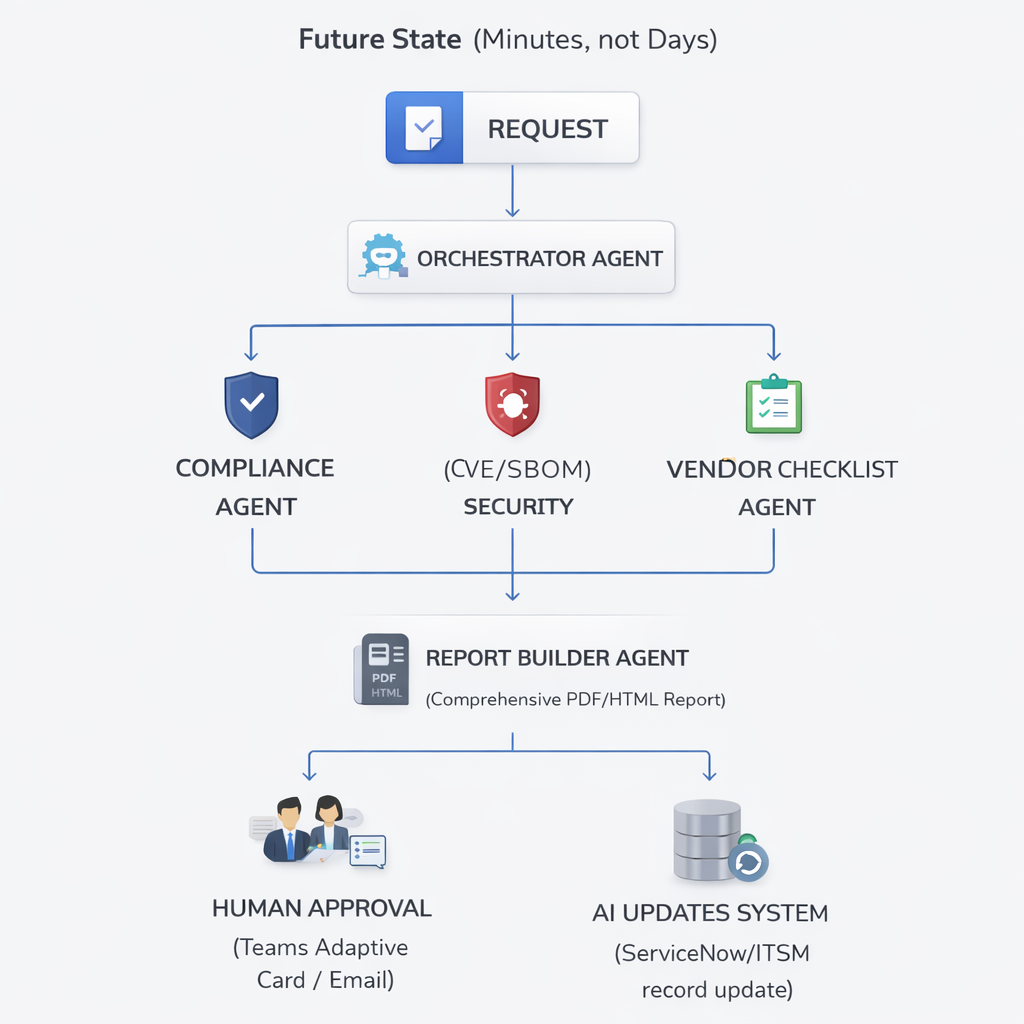
Key Platforms Used:
| Capability | Platform / Service |
|---|---|
| Agent orchestration & hosting | Microsoft Foundry Agent Service |
| LLM reasoning | Azure OpenAI gpt-4o (or o3) |
| Deep web research | Bing Grounding / Azure AI Search |
| Knowledge & memory | Foundry Agent IQ (Knowledge Store) |
| Workflow & approval | Microsoft Copilot Studio + Work IQ |
| System-of-record updates | Power Automate / Logic Apps |
| Monitoring & evaluation | Azure AI Foundry Evaluation + App Insights |
2. Multi-Agent Design
The system uses Microsoft Agent Framework (part of Azure AI Foundry) in a fan-out / fan-in topology. The Orchestrator delegates parallel research tasks to specialist agents and aggregates their outputs into a single structured report.
2.1 Orchestrator Agent
Role: Entry point. Receives the software request, extracts structured metadata, spawns specialist agents in parallel, waits for outputs, and hands the aggregated findings to the Report Builder Agent.
Foundry Agent Type: prompt agent backed by gpt-4o
System Prompt excerpt:
You are a Software Request Intake Orchestrator. When you receive a software request, extract:
- Software name, version, vendor, intended use case
- Business justification
- Requester name, department, cost center

Then invoke the following specialist agents in parallel:
- compliance_agent
- security_agent
- vendor_checklist_agent

Collect all outputs, then invoke report_builder_agent with the combined findings.
Tools registered in Foundry portal: | Tool | Purpose | |—|—| | invoke_agent (connected agent) | Fan-out to Compliance, Security, Vendor agents | | bing_grounding | Initial public web lookup of product | | azure_ai_search | Query internal policy knowledge base |
2.2 Compliance Research Agent
Role: Research the software against regulatory and policy frameworks relevant to the organization (SOC 2, ISO 27001, NIST, CIS Controls, GDPR, HIPAA, FedRAMP as applicable).
Foundry Agent Type: prompt agent backed by gpt-4o
System Prompt excerpt:
You are a Compliance Research Specialist. Your task is to evaluate the requested software against regulatory frameworks.
Research the following for the given software:
1. Does the vendor hold SOC 2 Type II / ISO 27001 certification? Are certifications current?
2. Is the software included in FedRAMP Marketplace (if applicable)?
3. Are there known GDPR, HIPAA, or CCPA compliance gaps?
4. What data residency options are available? Does the vendor offer data processing agreements (DPA)?
5. Review any relevant government or industry watchlists.

Output a structured JSON with: compliant (boolean), frameworks_checked (list), findings (list of {framework, status, notes}), risk_level (Low/Medium/High/Critical), evidence_urls (list).
Tools: | Tool | Purpose | |—|—| | bing_grounding | Web search for compliance certifications, DPA status | | azure_ai_search | Internal compliance policy knowledge base | | code_interpreter | Parse & summarize certification documents |
2.3 Security Research Agent
Role: Assess the software’s security posture — CVE history, SBOM, known vulnerabilities, breach history, and alignment with security benchmarks (NIST CSF, CIS Controls).
Foundry Agent Type: prompt agent backed by gpt-4o
System Prompt excerpt:
You are a Security Research Specialist. Evaluate the requested software for security risks.
Research the following:
1. Search the NVD (nvd.nist.gov) and CVE databases for known vulnerabilities. Report CVSS scores ≥ 7.0.
2. Check HaveIBeenPwned, BreachAware, and public breach databases for vendor incidents.
3. Identify whether the vendor publishes a SBOM or VEX document.
4. Assess patch cadence: how quickly does the vendor release security patches?
5. Check vendor's bug bounty program status.
6. Identify whether the software uses open-source components with high-severity OSS CVEs.

Output structured JSON with: cve_count_critical, cve_count_high, breach_history (list), patch_cadence, sbom_available (boolean), risk_score (0–100), risk_level, evidence_urls.
Tools: | Tool | Purpose | |—|—| | bing_grounding | CVE lookups, breach news, security advisories | | azure_ai_search | Internal security baseline knowledge | | code_interpreter | Score aggregation and risk calculation |
2.4 Vendor Checklist Agent
Role: Gather vendor viability, contractual, and procurement-related facts. Fill out the standard vendor due-diligence checklist automatically.
Foundry Agent Type: prompt agent backed by gpt-4o
System Prompt excerpt:
You are a Vendor Due Diligence Specialist. Evaluate the software vendor using the standard procurement checklist.
Research and answer the following:
1. Vendor financial health: publicly traded or privately held? Recent funding rounds? Revenue/employee size.
2. Is the vendor on any government denied/restricted vendor lists (e.g., Entity List, OFAC SDN)?
3. Support model: SLA tiers, support hours, dedicated account manager?
4. Pricing model: per-seat, consumption, enterprise agreement? Estimate annual cost for [N] users.
5. Data portability: can the organization export all data if the contract ends?
6. Subprocessors: who are the key subprocessors and where are they located?
7. Alternatives: list 2–3 comparable alternatives with a brief comparison.

Output structured JSON with: vendor_name, vendor_size, financial_health, restricted_list_check (clear/flagged), support_sla, estimated_annual_cost, data_portability, subprocessors (list), alternatives (list), overall_vendor_risk (Low/Medium/High).
Tools: | Tool | Purpose | |—|—| | bing_grounding | Web search for vendor info, news, financials | | azure_ai_search | Internal preferred vendors list | | file_search | Vendor onboarding policy documents |
2.5 Report Builder Agent
Role: Aggregate outputs from all research agents and produce a comprehensive, human-readable approval report (Markdown → rendered to HTML/PDF).
Foundry Agent Type: prompt agent backed by gpt-4o
System Prompt excerpt:
You are a Report Builder Agent. You receive structured JSON outputs from three research agents and assemble a comprehensive Software Approval Report.
Format the report according to the standard template (see knowledge base: "software-approval-report-template").
The report must include: Executive Summary, Compliance Section, Security Section, Vendor Section, Risk Matrix, Recommendation, and an Appendix with all source URLs.
Set the overall recommendation to: APPROVE / CONDITIONAL APPROVE / REJECT based on aggregated risk.
Output valid Markdown.
Tools: | Tool | Purpose | |—|—| | azure_ai_search | Retrieve report template and past approved reports | | code_interpreter | Render risk matrix table, format JSON → Markdown |
2.6 System Updater Agent
Role: After human decision, update the system of record (ServiceNow, Jira, or SharePoint list) with the final approval status and store the report artifact.
Foundry Agent Type: hosted agent (uses Power Automate HTTP connector or custom tool)
Tools: | Tool | Purpose | |—|—| | http_connector (custom) | POST to ServiceNow/ITSM REST API | | sharepoint_connector | Upload report PDF and update list item status | | email_connector | Send approval notification to requester |
3. LLM & Web Search Configuration
Model Selection
Configure models in Microsoft Foundry > Model Catalog > Deployments:
| Agent | Recommended Model | Rationale |
|---|---|---|
| Orchestrator | gpt-4o (2024-11-20) | Fast reasoning, tool calling, low latency |
| Compliance Agent | gpt-4o or o3 | Deep document reasoning |
| Security Agent | gpt-4o or o3 | Long context for CVE reports |
| Vendor Checklist | gpt-4o | General research |
| Report Builder | gpt-4o | Long-form structured writing |
Deployment settings (Foundry portal):
Model version:      gpt-4o (2024-11-20)
Deployment name:    gpt-4o-swreq
Tokens per minute:  100,000 (TPM) — scale as needed
Content filtering:  Enabled (default policy)
Grounding with Bing Search (Native Connector)
Microsoft Foundry provides a first-party Grounding with Bing Search tool — no separate Azure Bing Search resource provisioning is required. Configure it entirely within the portal:
- In the Microsoft Foundry portal, open your project and navigate to Knowledge in the left navigation pane (the Foundry IQ page).
- Click Create a knowledge base (top right).
- In the “Choose a knowledge type” dialog, scroll to the Tools section at the bottom.
- Select Grounding with Bing Search — “Enable your agent to use Grounding with Bing Search to access and return information from the web”.
- Click Connect — the connection is established automatically with no API key or external resource required.
- Once connected, the tool appears in your project’s tool list and can be added to any agent via the Agent Builder.
Tip: Configure each research agent’s system prompt to issue multiple targeted queries rather than one broad query (e.g.,
"<SoftwareName> SOC 2 certification 2025"vs."<SoftwareName> compliance").
Web Knowledge Base (Deep, Scheduled Research)
For authoritative, periodically refreshed web content (NIST, CIS Controls, vendor documentation sites), use the Web knowledge base type in the Foundry IQ portal to build an AI Search-backed index that agents query via the Azure AI Search tool:
- In your project, navigate to Knowledge (left nav) — this opens the Foundry IQ page.
- Click Create a knowledge base (top right button).
- In the “Choose a knowledge type” dialog, under Configure a knowledge base, select Web — “Ground with real-time web content via Bing”.
- Click Connect.
- Enter a name (e.g.,
web-security-kb) and add the URLs to crawl — for example:https://nvd.nist.gov(CVE/NVD data)https://www.cisecurity.org/controls(CIS Controls)https://marketplace.fedramp.gov(FedRAMP authorized products)
- Select embedding model:
text-embedding-3-large. - Enable semantic chunking.
- Set a refresh schedule (weekly recommended for compliance and security sites).
- Once the knowledge base is active, add it to the relevant research agent via the agent’s Knowledge tab in Agent Builder.
Azure AI Search (Internal Knowledge)
Use Azure AI Search as a grounding store for internal policies, past reports, and approved/denied vendor lists.
- Provision an Azure AI Search instance (Standard tier recommended).
- Create indexes:
policy-index— internal IT/security/compliance policiesvendor-index— approved/denied vendors, past evaluationsreport-template-index— approved report templates and past successful reports
- Connect in Foundry: navigate to Knowledge (left nav) → Create a knowledge base → under the Tools section in the dialog, select Azure AI search and follow the connection flow.
- Configure semantic ranking:
{
  "tool_type": "azure_ai_search",
  "index_name": "policy-index",
  "query_type": "semantic",
  "semantic_config": "policy-semantic-config",
  "top_k": 5
}
o3 / Deep Research Mode (Optional Advanced Config)
For higher-stakes approvals, route Compliance and Security agents to o3 for deeper multi-step reasoning:
- Deploy
o3in Foundry > Model Catalog. - Set
reasoning_effort: "high"in the agent system message or API parameters. - Note:
o3has higher latency (~minutes per complex query); use for async/background processing.
4. Report Output Specification
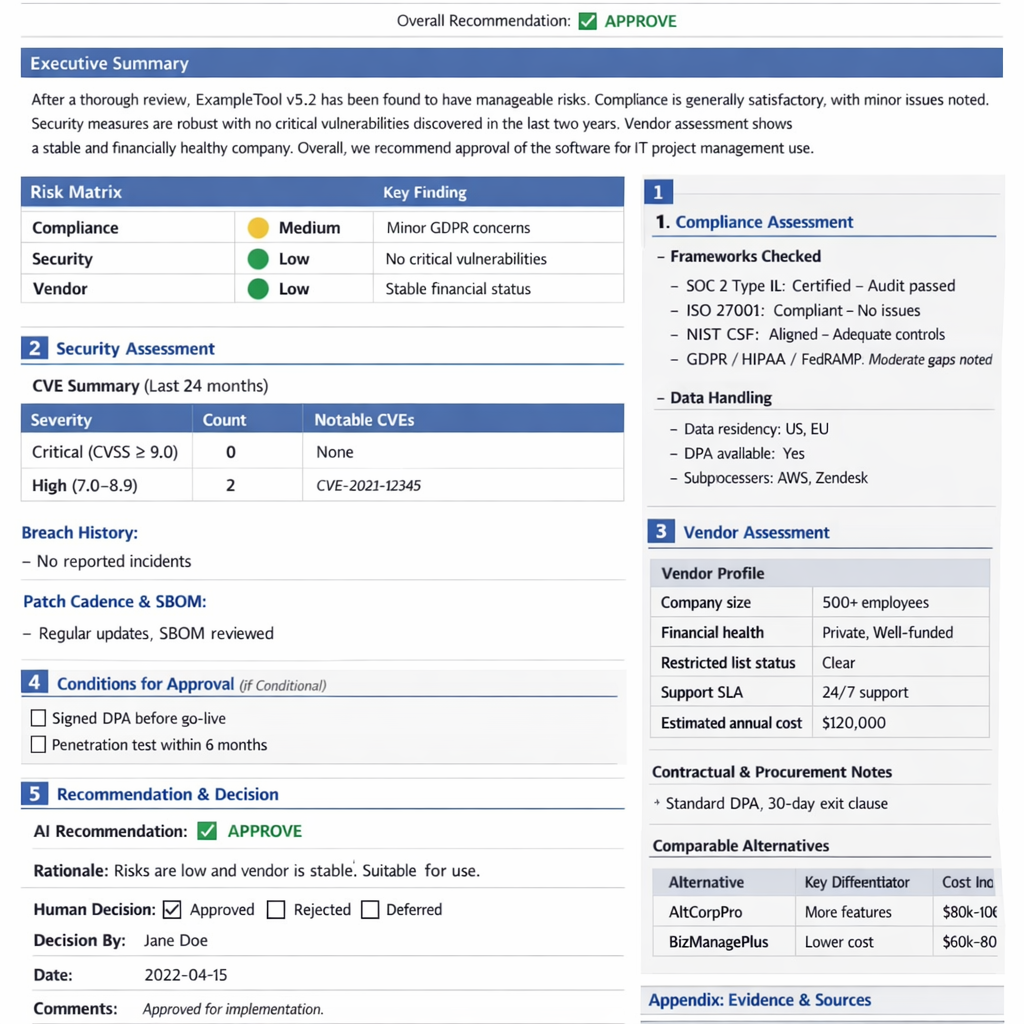
The Report Builder Agent produces a structured Markdown document that is converted to HTML/PDF before being routed to the human approver. The report must contain the following sections to be considered complete:
4.1 Report Template
# Software Approval Report
**Report ID:** SW-YYYYMMDD-XXXX
**Generated:** [timestamp]
**Requested By:** [name, department]
**Software:** [name] v[version] — [vendor]
**Use Case:** [description]
**Overall Recommendation:** ✅ APPROVE | ⚠️ CONDITIONAL APPROVE | ❌ REJECT

---
## Executive Summary
[2–3 paragraph AI-written summary of overall risk and recommendation rationale]

## Risk Matrix
| Category | Risk Level | Key Finding |
|---|---|---|
| Compliance | 🟢 Low / 🟡 Medium / 🔴 High | [finding] |
| Security | 🟢 Low / 🟡 Medium / 🔴 High | [finding] |
| Vendor | 🟢 Low / 🟡 Medium / 🔴 High | [finding] |

## 1. Compliance Assessment
### Frameworks Checked
- SOC 2 Type II: [status] — [notes]
- ISO 27001: [status] — [notes]
- NIST CSF: [status] — [notes]
- GDPR / HIPAA / FedRAMP: [status] — [notes]

### Data Handling
- Data residency: [regions]
- DPA available: [Yes/No/Link]
- Subprocessors: [list]

### Compliance Findings
[Detailed narrative]

## 2. Security Assessment
### CVE Summary (Last 24 months)
| Severity | Count | Notable CVEs |
|---|---|---|
| Critical (CVSS ≥ 9.0) | N | CVE-XXXX-YYYY |
| High (7.0–8.9) | N | — |

### Breach History
[Vendor breach incidents]

### Patch Cadence & SBOM
[Assessment]

### Security Recommendation
[Narrative]

## 3. Vendor Assessment
### Vendor Profile
| Attribute | Value |
|---|---|
| Company size | [employees, revenue] |
| Financial health | [public/private, funding] |
| Restricted list status | Clear / FLAGGED |
| Support SLA | [details] |
| Estimated annual cost | $[N] |

### Contractual & Procurement Notes
[DPA, exit clauses, data portability]

### Comparable Alternatives
| Alternative | Key Differentiator | Cost Indication |
|---|---|---|
| [Alt 1] | [note] | [range] |
| [Alt 2] | [note] | [range] |

## 4. Conditions for Approval (if Conditional)
- [ ] Condition 1: [e.g., Require signed DPA before go-live]
- [ ] Condition 2: [e.g., Penetration test results within 6 months]

## 5. Recommendation & Decision

**AI Recommendation:** [APPROVE / CONDITIONAL APPROVE / REJECT]
**Rationale:** [detailed justification]

**Human Decision:** [ ] Approved  [ ] Rejected  [ ] Deferred
**Decision By:** ______________________
**Date:** ______________________
**Comments:** ______________________

## Appendix: Evidence & Sources
| Source | URL | Retrieved |
|---|---|---|
| [description] | [url] | [date] |
4.2 Report Quality Gates
Before routing to human approver, the Report Builder Agent must verify:
- All three research agent outputs received (no timeouts)
- At least 5 evidence URLs cited per section
- Risk matrix fully populated
- Recommendation field set
If any gate fails, flag the report as INCOMPLETE and alert the workflow coordinator.
5. Azure Resource Deployment
5.1 Prerequisites
- Azure subscription with Owner or Contributor + User Access Administrator roles
- Azure CLI installed (
az --version≥ 2.60) - Azure Developer CLI installed (
azd --version≥ 1.9) - Bicep CLI (
az bicep install) - Azure AI Projects Python SDK (installed via
pip install azure-ai-projects)
5.2 Provision the Foundry Project
Step 1 — Create a resource group:
az group create \
  --name rg-swreq-approval \
  --location eastus2
Step 2 — Create the Microsoft Foundry Project:
In the Microsoft Foundry portal:
- Click + New project.
- Set Project name:
swreq-approval-project. - Select your subscription and resource group
rg-swreq-approval. - Select region:
East US 2(recommended for model availability). - Under Customize, the portal auto-provisions the required backing resources:
- Azure AI Services (multi-service account)
- Azure Key Vault
- Azure Storage Account
- Click Create project.
The explicit Hub resource is abstracted in the current Microsoft Foundry experience. The Project is the primary workspace. A hub is created automatically in the background but you interact exclusively with the project.
Step 3 — Note the project endpoint:
https://<hub-name>.services.ai.azure.com/api/projects/<project-name>
5.3 Deploy Supporting Services
Azure OpenAI Model Deployment:
In Foundry > Model Catalog:
- Search for
gpt-4o. - Select version
2024-11-20. - Click Deploy > Customize:
- Deployment name:
gpt-4o-swreq - Tokens per minute:
100,000
- Deployment name:
- Repeat for
o3(optional, for deep research agents).
Grounding with Bing Search is a native first-party tool in Microsoft Foundry — no separate Bing resource provisioning is needed. It is enabled directly in the agent’s Tools panel in the portal (see Section 3).
Azure AI Search:
az search service create \
  --name ai-search-swreq \
  --resource-group rg-swreq-approval \
  --sku standard \
  --location eastus2 \
  --partition-count 1 \
  --replica-count 1
Azure Storage (for report artifacts):
az storage account create \
  --name swreqreports \
  --resource-group rg-swreq-approval \
  --location eastus2 \
  --sku Standard_LRS \
  --kind StorageV2
5.4 Configure Standard Agent Setup
The Standard Agent Setup enables bringing your own Azure Storage and AI Search for agent threads and knowledge.
In the Foundry portal:
- Navigate to your project > Settings > Agent settings.
- Select Standard setup.
- Connect:
- Azure AI Storage: select
swreqreportsstorage account. - Azure AI Search: select
ai-search-swreq.
- Azure AI Storage: select
- Click Apply.
This provisions a Capability Host that agents use for thread storage, file retrieval, and knowledge indexing.
6. Foundry Agent Configuration (No-Code)
All agents are configured entirely through the Microsoft Foundry portal — no custom code deployment required for the core multi-agent workflow.
6.1 Orchestrator Agent Setup
- In ai.azure.com, open your project.
- Navigate to Agents > + New agent.
- Set:
- Name:
orchestrator-agent - Model:
gpt-4o-swreq - Instructions: Paste the Orchestrator system prompt from Section 2.1.
- Name:
- Under Tools, add:
- Bing Grounding → select your Bing connection
- Azure AI Search → index:
policy-index - Connected Agents → add
compliance-agent,security-agent,vendor-checklist-agent
- Click Save.
Connected Agents is the Foundry portal feature that enables the fan-out multi-agent pattern without code. Each connected agent appears as a callable tool to the orchestrator.
6.2 Research Agent Setup (Compliance, Security, Vendor)
Repeat for each research agent (compliance-agent, security-agent, vendor-checklist-agent):
- Agents > + New agent.
- Configure name and paste the relevant system prompt from Section 2.
- Model:
gpt-4o-swreq(oro3for compliance/security if deeper reasoning needed). - Tools:
- Bing Grounding (all three agents)
- Azure AI Search → appropriate index per agent
- Code Interpreter → enable for Security and Compliance agents
- Save.
6.3 Report Builder Agent Setup
- Agents > + New agent, name:
report-builder-agent. - Model:
gpt-4o-swreq. - Instructions: Paste Report Builder system prompt from Section 2.5.
- Tools:
- Azure AI Search →
report-template-index - Code Interpreter → enabled
- File Search → enabled (for retrieving template documents)
- Azure AI Search →
- Upload the report template (from Section 4.1) as a knowledge file in the agent’s Files tab.
- Save.
7. Microsoft Copilot Studio & Work IQ Integration
Microsoft Copilot Studio serves as the conversational front-end and workflow coordinator. Work IQ (part of Microsoft 365 Copilot) provides work-context awareness (org chart, requester history, budget approval chains).
7.1 Submission Channel (Copilot Studio)
- In Copilot Studio, create a new AI Agent:
Software Request Bot. - Add a topic: “New Software Request”.
- Define an intake form collecting:
- Software name + version
- Vendor name
- Business justification
- Requester details (auto-populated from Entra ID)
- Number of licenses needed
- Add an action: Call Azure AI Foundry agent (use the HTTP connector to trigger the
orchestrator-agentvia the Foundry Agents API). - Publish the bot to Microsoft Teams for end-user access.
7.2 Approval Routing (Work IQ)
Work IQ connects the AI process to organizational approval chains:
- After the report is generated, use Power Automate triggered by the Foundry agent completion to:
- Route the report to the correct approver based on requester’s department (resolved via Work IQ’s org-hierarchy lookup).
- Send an Adaptive Card in Teams to the approver with: report link, AI recommendation, approve/reject/defer buttons.
- The approver’s decision is captured back into Power Automate, which triggers the System Updater Agent.
7.3 Copilot Studio + Foundry Connection Setup
- In Copilot Studio, add a custom connector pointing to:
POST https://<project-endpoint>/agents/<agent-id>/sessions/<session-id>/messages - Authenticate using Entra ID (OAuth 2.0) — no API keys in connectors.
- Configure the connector action to pass the user’s intake form as the message body.
8. Foundry Agent IQ (Knowledge & Grounding)
Agent IQ (the knowledge indexing capability in Foundry) gives agents long-term memory and domain-specific grounding beyond web search.
8.1 Knowledge Indexes to Configure
| Index Name | Content | Use By |
|---|---|---|
policy-index | IT security policy, acceptable use policy, procurement policy | All agents |
vendor-index | Approved vendor list, denied vendor list, past evaluations | Orchestrator, Vendor Agent |
report-template-index | Past approved reports, report templates | Report Builder |
compliance-frameworks-index | NIST CSF, CIS Controls, ISO annexes, FedRAMP package docs | Compliance Agent |
cve-bulletins-index | Internal security advisories, patch notes, red team findings | Security Agent |
8.2 Populating Knowledge Bases
All knowledge bases are created from the Foundry IQ page:
- In your project, navigate to Knowledge in the left navigation pane.
- Click Create a knowledge base (top right).
- In the “Choose a knowledge type” dialog, select the appropriate source under Configure a knowledge base:
| Source | When to use | Notes |
|---|---|---|
| Azure AI Search Index | Connect an existing AI Search index | Enterprise-scale; use for policy-index, vendor-index |
| Azure Blob Storage | Upload policy PDFs, past reports | Backed by Foundry IQ ingestion pipeline |
| Web | Crawl NIST, CIS, FedRAMP, vendor docs | Real-time web via Bing; no re-indexing required |
| Microsoft SharePoint (Remote) | Live SharePoint content without indexing | Uses Microsoft 365 governance; content retrieved at query time |
| Microsoft SharePoint (Indexed) | SharePoint content indexed into AI Search | Best for custom retrieval pipelines with semantic ranking |
| Microsoft OneLake | Unstructured data from Fabric/OneLake | Use for large-scale analytics data sources |
- Follow the Connect flow for the selected source type.
- Set refresh schedule (weekly recommended for compliance and security knowledge bases).
- Once the knowledge base status shows Active, add it to the relevant agent via the agent’s Knowledge tab in Agent Builder.
8.3 Grounding Strategy
- Compliance Agent: Query
compliance-frameworks-indexfirst (internal), thenbing_groundingfor live certification status. - Security Agent: Query
cve-bulletins-index(internal), then Bing for live NVD data. - Vendor Agent: Query
vendor-index(internal approved/denied list), then Bing for public vendor info. - Report Builder: Query
report-template-indexonly (no live web search needed).
9. Human Approval Workflow
9.1 Teams Adaptive Card
The approver receives a Teams Adaptive Card (sent via Power Automate) that contains an embedded summary and links to the full report:
{
  "type": "AdaptiveCard",
  "version": "1.5",
  "body": [
    { "type": "TextBlock", "text": "Software Approval Request", "size": "Large", "weight": "Bolder" },
    { "type": "FactSet", "facts": [
      { "title": "Software", "value": "${softwareName} v${version}" },
      { "title": "Requester", "value": "${requesterName}, ${department}" },
      { "title": "AI Recommendation", "value": "${recommendation}" },
      { "title": "Risk Level", "value": "${overallRisk}" }
    ]},
    { "type": "TextBlock", "text": "${executiveSummary}", "wrap": true }
  ],
  "actions": [
    { "type": "Action.Submit", "title": "✅ Approve", "data": { "decision": "approve" } },
    { "type": "Action.Submit", "title": "⚠️ Conditional Approve", "data": { "decision": "conditional" } },
    { "type": "Action.Submit", "title": "❌ Reject", "data": { "decision": "reject" } },
    { "type": "Action.OpenUrl", "title": "📄 View Full Report", "url": "${reportUrl}" }
  ]
}
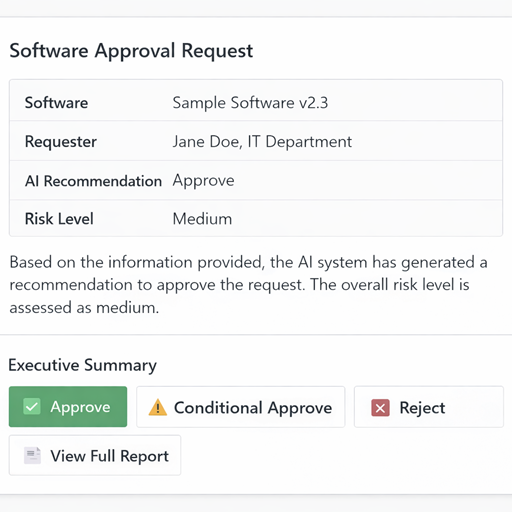
9.2 Past Reports as Grounding (“Which past reports have succeeded?”)
The system learns from history. The Report Builder Agent queries report-template-index for:
- Past APPROVED reports for similar software categories → use as positive grounding examples.
- Past REJECTED reports → identify common rejection reasons to flag proactively.
This directly maps to the “Which past reports have succeeded?” annotation in the architecture diagram.
9.3 System Identification (“Which systems?”)
When the System Updater Agent runs post-approval, it identifies all downstream systems that need updating:
- ServiceNow — create CMDB entry / software asset record
- Microsoft Entra ID — begin provisioning group/license assignment
- Microsoft Intune — flag for app packaging/deployment
- SharePoint Software Catalog — add to approved software list
10. Security & RBAC
10.1 Identity Model
All agents authenticate to Azure services using Managed Identity — no secrets or API keys in agent configurations.
| Identity | Type | Permissions |
|---|---|---|
| Foundry Agent Service | System-assigned MI | Azure AI Search Data Reader, Storage Blob Data Contributor |
| Copilot Studio Connector | User-delegated | Foundry Agents API caller (custom role) |
| Power Automate Flows | Connection MI | Teams message sender, SharePoint writer |
| System Updater Agent | System-assigned MI | ServiceNow integration (HTTPS only) |
10.2 RBAC Configuration
# Grant Foundry project agents access to Azure AI Search
az role assignment create \
  --assignee <foundry-agent-managed-identity-object-id> \
  --role "Search Index Data Reader" \
  --scope /subscriptions/{sub}/resourceGroups/rg-swreq-approval/providers/Microsoft.Search/searchServices/ai-search-swreq

# Grant access to Storage for report uploads
az role assignment create \
  --assignee <foundry-agent-managed-identity-object-id> \
  --role "Storage Blob Data Contributor" \
  --scope /subscriptions/{sub}/resourceGroups/rg-swreq-approval/providers/Microsoft.Storage/storageAccounts/swreqreports
10.3 Content Safety
In Foundry > Content Safety:
- Enable Prompt Shield (jailbreak detection) on all agents — prevents adversarial software submissions designed to bypass security review.
- Set Content Filtering to
"Balanced"profile. - Enable Groundedness Detection on the Report Builder Agent to flag hallucinated evidence URLs.
11. Monitoring & Evaluation
11.1 Application Insights
Foundry automatically integrates with Application Insights. Configure custom dashboards:
- In Foundry > Tracing, link an Application Insights workspace.
- Monitor:
- Agent invocation latency per research agent
- Token consumption per request
- Tool call success/failure rates
- End-to-end report generation time
11.2 Foundry Evaluation
Use Foundry Evaluation to continuously assess report quality:
- Create evaluation dataset: In Foundry > Evaluation > Datasets, harvest 20–30 completed reports as ground truth.
- Configure evaluators:
- Groundedness — are report claims supported by cited sources?
- Relevance — is the report relevant to the requested software?
- Coherence — is the report logically structured?
- Custom evaluator — “Report Completeness” (checks all required sections present).
- Run evaluations weekly or after each model/prompt update.
- Set regression alerts: alert if any evaluator score drops >10% vs. baseline.
11.3 Key Metrics to Track
| Metric | Target | Alert Threshold |
|---|---|---|
| End-to-end report time | < 5 minutes | > 15 minutes |
| Report completeness score | > 90% | < 80% |
| Groundedness score | > 85% | < 75% |
| Human approval rate | Track (no target) | N/A |
| Bing tool call success rate | > 98% | < 95% |
12. End-to-End Flow Summary
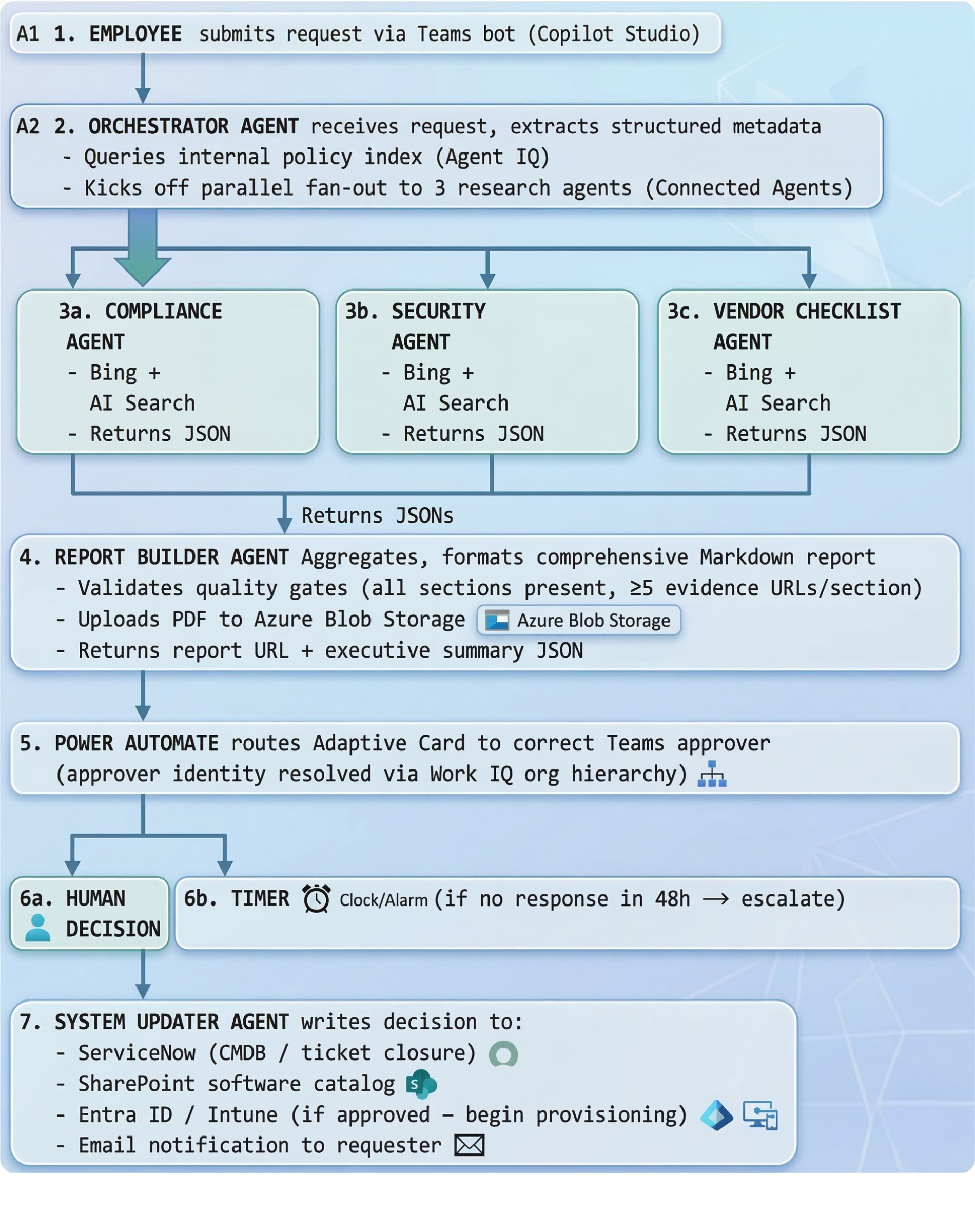
Total elapsed time: ~3–7 minutes (vs. multiple days manually)