Report Specification
The structure, template, and quality requirements for the AI-generated approval report.
Table of Contents
Overview
The Report Builder Agent produces a structured Markdown document that Power Automate converts to HTML/PDF before routing to the human approver. Every report must pass the quality gates before it is considered complete.
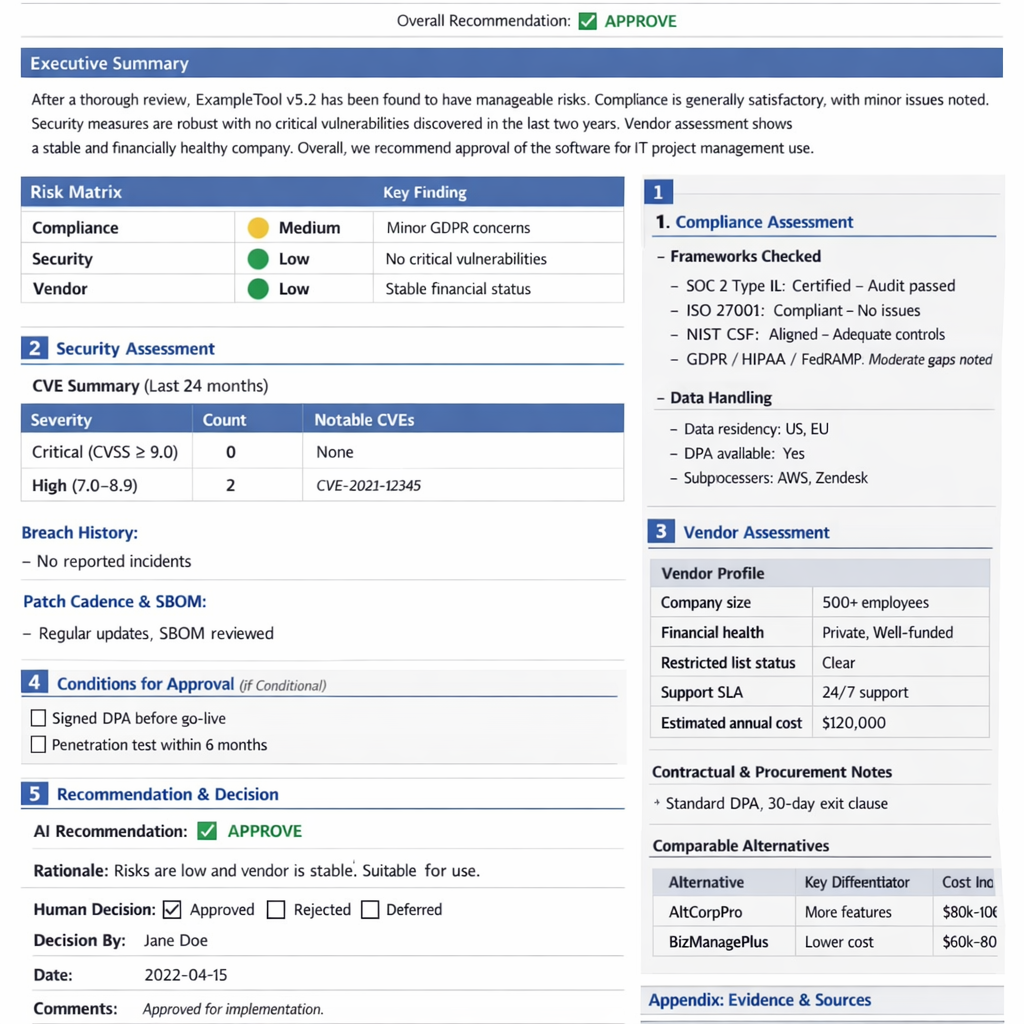
Report Template
Upload this template to the agent’s Files tab in Foundry and index it under report-template-index so the Report Builder can retrieve it as a grounding document.
# Software Approval Report
**Report ID:** SW-YYYYMMDD-XXXX
**Generated:** [timestamp]
**Requested By:** [name, department]
**Software:** [name] v[version] — [vendor]
**Use Case:** [description]
**Overall Recommendation:** ✅ APPROVE | ⚠️ CONDITIONAL APPROVE | ❌ REJECT

---

## Executive Summary
[2–3 paragraph AI-written summary of overall risk and recommendation rationale]

## Risk Matrix
| Category   | Risk Level                              | Key Finding |
|---|---|---|
| Compliance | 🟢 Low / 🟡 Medium / 🔴 High            | [finding]   |
| Security   | 🟢 Low / 🟡 Medium / 🔴 High            | [finding]   |
| Vendor     | 🟢 Low / 🟡 Medium / 🔴 High            | [finding]   |

---

## 1. Compliance Assessment

### Frameworks Checked
- SOC 2 Type II: [status] — [notes]
- ISO 27001: [status] — [notes]
- NIST CSF: [status] — [notes]
- GDPR / HIPAA / FedRAMP: [status] — [notes]

### Data Handling
- Data residency: [regions]
- DPA available: [Yes / No / Link]
- Subprocessors: [list]

### Compliance Findings
[Detailed narrative]

---

## 2. Security Assessment

### CVE Summary (Last 24 months)
| Severity              | Count | Notable CVEs     |
|---|---|---|
| Critical (CVSS ≥ 9.0) | N     | CVE-XXXX-YYYY    |
| High (7.0–8.9)        | N     | —                |

### Breach History
[Vendor breach incidents]

### Patch Cadence & SBOM
[Assessment]

### Security Recommendation
[Narrative]

---

## 3. Vendor Assessment

### Vendor Profile
| Attribute              | Value                      |
|---|---|
| Company size           | [employees, revenue]       |
| Financial health       | [public/private, funding]  |
| Restricted list status | Clear / FLAGGED            |
| Support SLA            | [details]                  |
| Estimated annual cost  | $[N]                       |

### Contractual & Procurement Notes
[DPA, exit clauses, data portability]

### Comparable Alternatives
| Alternative | Key Differentiator | Cost Indication |
|---|---|---|
| [Alt 1]     | [note]             | [range]         |
| [Alt 2]     | [note]             | [range]         |

---

## 4. Conditions for Approval (if Conditional)
- [ ] Condition 1: [e.g., Require signed DPA before go-live]
- [ ] Condition 2: [e.g., Penetration test results within 6 months]

---

## 5. Recommendation & Decision

**AI Recommendation:** [APPROVE / CONDITIONAL APPROVE / REJECT]
**Rationale:** [detailed justification]

**Human Decision:** [ ] Approved  [ ] Rejected  [ ] Deferred
**Decision By:** ______________________
**Date:** ______________________
**Comments:** ______________________

---

## Appendix: Evidence & Sources
| Source        | URL     | Retrieved |
|---|---|---|
| [description] | [url]   | [date]    |
Quality Gates
Before routing to the human approver, the Report Builder Agent verifies:
| Gate | Check |
|---|---|
| All research outputs received | No timeouts from Compliance, Security, or Vendor agents |
| Evidence cited | ≥ 5 evidence URLs per section |
| Risk matrix populated | All three risk categories have a level and finding |
| Recommendation set | Field is not empty or [TBD] |
If any quality gate fails, the report is flagged INCOMPLETE and the workflow coordinator is alerted. The request is held until the gap is resolved — it is not routed to the human approver in an incomplete state.
Report ID Convention
Report IDs follow the pattern SW-YYYYMMDD-XXXX:
SW— Software request type prefixYYYYMMDD— Date of report generationXXXX— Zero-padded sequential number within the day (e.g.,0001,0042)
Reports are stored in Azure Blob Storage (swreqreports) under path:
reports/YYYY/MM/SW-YYYYMMDD-XXXX.md
reports/YYYY/MM/SW-YYYYMMDD-XXXX.pdf
Next Steps
- Usage & Approval Workflow — see how the completed report is routed to the approver.
- Monitoring & Evaluation — set up Foundry Evaluation to track report quality over time.