Architecture Overview
High-level design of the AI-powered Software Request Approval system.
Table of Contents
System Design
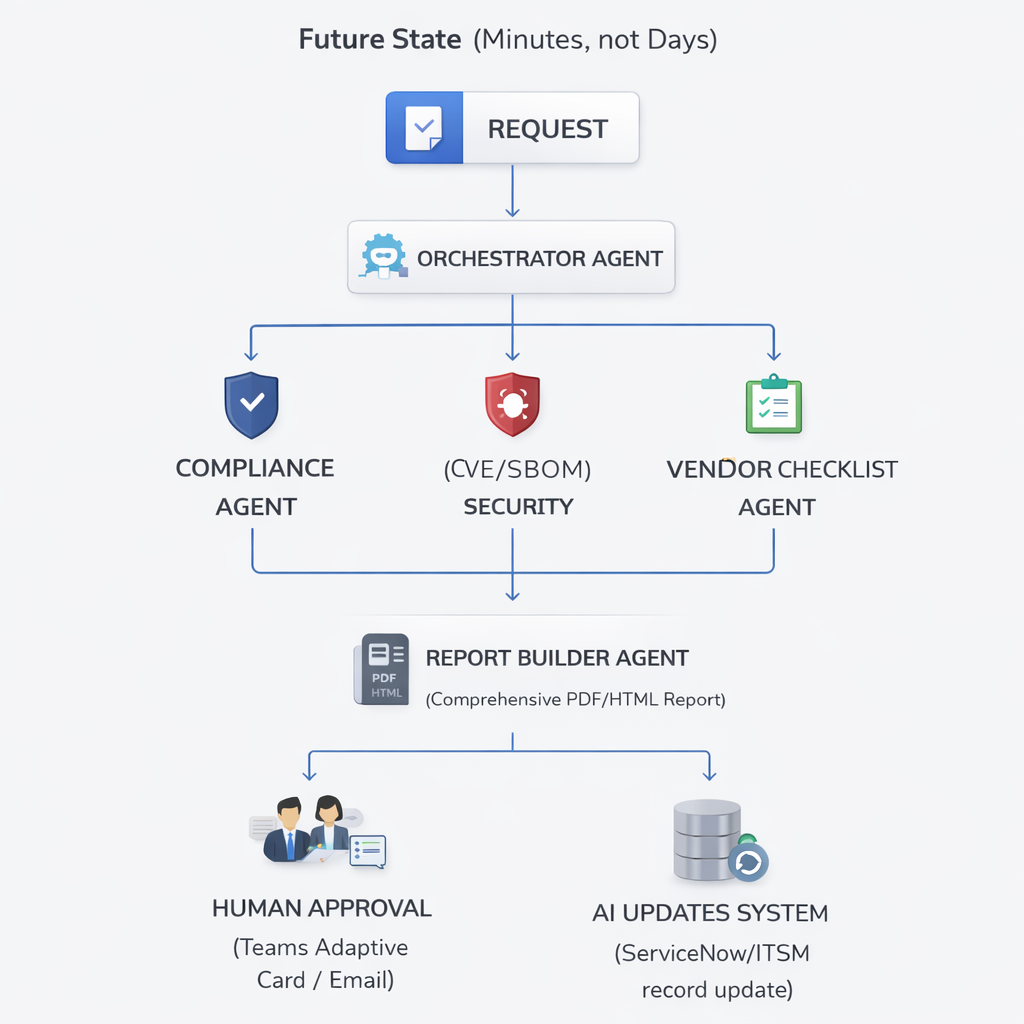
The system uses a fan-out / fan-in multi-agent topology built on Microsoft Foundry Agent Service. A single Orchestrator Agent receives every software request, delegates parallel research to three specialist agents, aggregates the findings, and passes them to a Report Builder for final assembly.
Key Platforms
| Capability | Platform / Service |
|---|---|
| Agent orchestration & hosting | Microsoft Foundry Agent Service |
| LLM reasoning | Azure OpenAI gpt-4o (2024-11-20) or o3 |
| Real-time web research | Grounding with Bing Search (native Foundry connector) |
| Internal knowledge | Azure AI Search (policy, vendor, report indexes) |
| Knowledge indexing | Foundry Agent IQ (Knowledge Store) |
| Conversational front-end | Microsoft Copilot Studio |
| Approval routing | Work IQ + Power Automate + Teams Adaptive Cards |
| System-of-record updates | Power Automate / Logic Apps |
| Monitoring | Azure AI Foundry Evaluation + Application Insights |
Agent Topology
[Copilot Studio Bot] ──── intake form ────▶ [Orchestrator Agent]
                                                  │
                         ┌────────────────────────┼────────────────────────┐
                         ▼                        ▼                        ▼
              [Compliance Agent]        [Security Agent]        [Vendor Checklist Agent]
                         │                        │                        │
                         └────────────────────────┘────────────────────────┘
                                                  │  aggregated JSON
                                                  ▼
                                        [Report Builder Agent]
                                                  │  structured Markdown report
                                                  ▼
                                    [Power Automate → Teams Adaptive Card]
                                                  │  human decision
                                                  ▼
                                        [System Updater Agent]
                                   (ServiceNow / Entra ID / SharePoint)
All agent-to-agent communication uses the Connected Agents feature in Microsoft Foundry — no custom orchestration code required.
End-to-End Flow
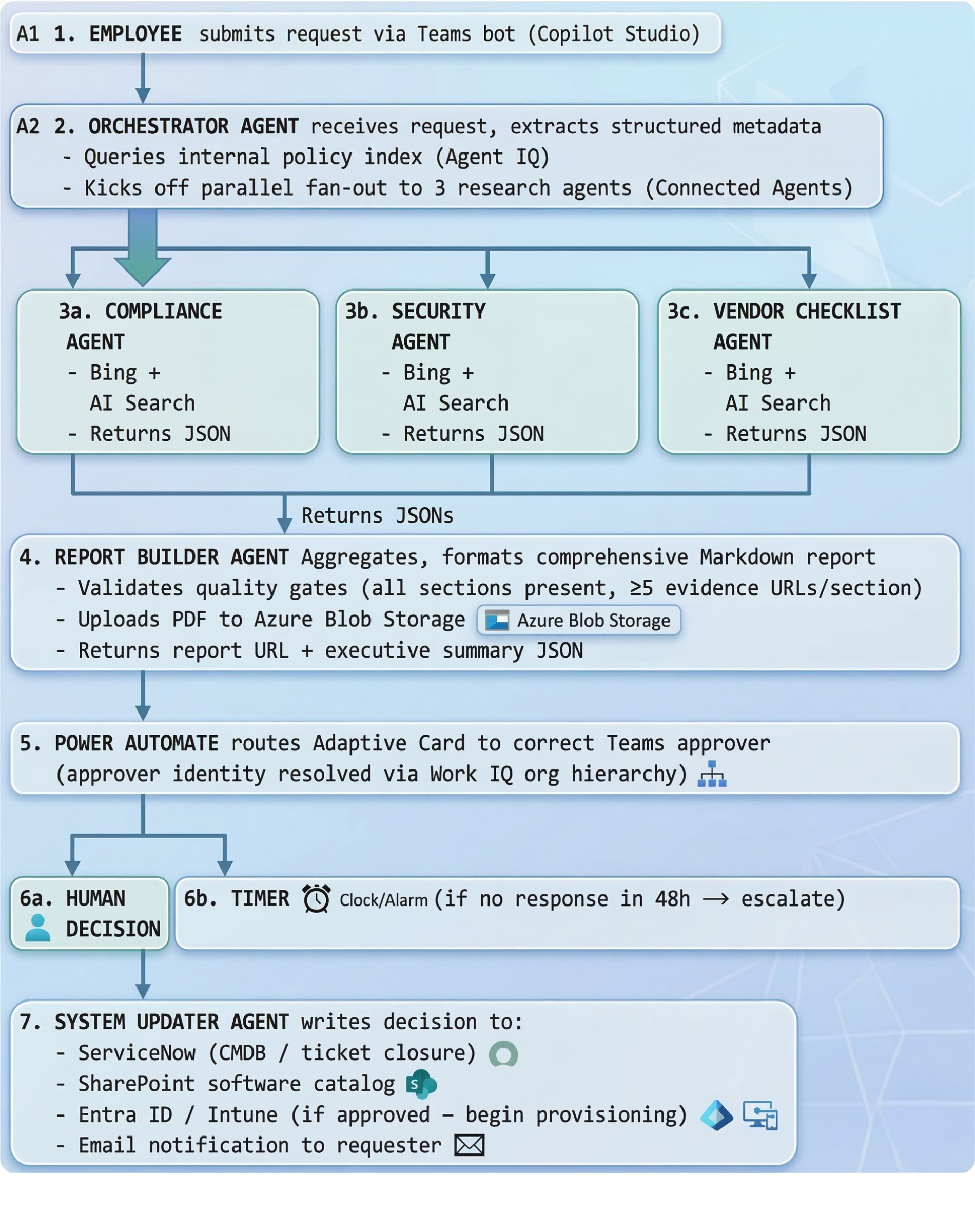
| Step | Actor | Action |
|---|---|---|
| 1 | Employee | Submits request via Teams bot |
| 2 | Orchestrator Agent | Parses metadata, fans out to research agents (parallel) |
| 3 | Compliance Agent | Checks SOC 2, ISO 27001, NIST, FedRAMP, GDPR status |
| 4 | Security Agent | Queries NVD/CVE databases, breach history, patch cadence |
| 5 | Vendor Checklist Agent | Assesses vendor financials, restricted lists, support SLA |
| 6 | Report Builder Agent | Aggregates findings into a structured Markdown report |
| 7 | Power Automate | Routes report to approver via Teams Adaptive Card |
| 8 | Approver | Reviews AI recommendation and decides in one click |
| 9 | System Updater Agent | Writes decision to ServiceNow, Entra ID, SharePoint |
Total elapsed time: ~3–7 minutes (vs. multiple days manually).
Design Decisions
Why no custom code? The entire core workflow runs as no-code/low-code using Foundry Agent Builder, Connected Agents, and Copilot Studio. Code is only needed for advanced customizations beyond the portal.
Why fan-out? Running the three research agents in parallel cuts total latency to the duration of the slowest single agent rather than the sum of all three.
o3 latency: If routing Compliance or Security agents to o3 for deeper reasoning, expect per-query times of several minutes. Configure these agents for async/background processing in production.
Next Steps
- See Multi-Agent Design for each agent’s full system prompt, tools, and configuration.
- See Getting Started to provision the Azure resources and create the Foundry project.